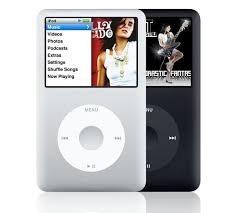
An iPod is a portable device that is used to play audio files of MP3 or AAC format. Released in 2001, the iPod’s of today come in a variety of shapes and sizes with varying storage capacities, right from the 512MB iPod Shuffle to the 160 GB iPod Classic! IPod’s are compatible with PCs running Windows 2000 or Windows XP and Macintosh computers running Mac OS X. here is more on how iPod’s work! IPod’s started off as portable music players, but today they can be used to play movies, view photos, play games, store text documents, set reminders and can also be used as an alarm clock! A regular iPod uses a tiny hard disk for storage; however the iPod Shuffle uses a kind of memory known as flash memory. Unlike regular computer memory, flash memory is much faster; uses less power and does not get reset on being switched off. Content is transferred from your Computer to your iPod using a USB cable.
IPod and iTunesThe best part about the iPod is its simplicity. All iPod’s are completely integrated with iTunes. ITunes is a software created by Apple, which is used to add and remove, content from an iPod. This happens automatically without any intervention from the user. With iTunes you can "rip" music from CD’s into MP3 or AAC formats to your computer.
When your iPod is connected to your PC, iTunes automatically updates your music library, keeping track of how often you played a song and also adds new songs and play lists to your iPod. An iPod can also be used on multiple computers; however synchronization occurs only in 1 direction. You cannot transfer songs from your iPod to a computer. However, the iPod can be used as a hard-drive to transfer data over different computers but will not be able to play this data.
Supported Audio FormatsThe iPod can play AAC (Advanced Audio Coding) format in addition to standard MP3 audio format. Audio files in ACC format being smaller and of the same quality as compared to MP3 files, makes song management on your iPod much quicker. In addition to this, iTunes comes with a built in converter that is capable of converting most audio format to MP3 or AAC.
Skip ProtectionThe iPod is designed for people with an active lifestyle. It is compact and light enough to take with you wherever you go. In addition to the hard drive, the iPod has a memory cache, which is made up of solid-state memory. Therefore, it has no mechanical or moving parts and is not affected by movement of the device. The iPod offers up to 20 minutes of skip protection, so whether it’s walking or mountain climbing u can do so without skipping a beat!
Non-Music Features- Videos – The iPod can be used to play videos in MPEG-4 or H.264 codecs. Adding videos to your iPod can be a little inconvenient as the above formats are not easily available. But never fear there’s a wide range of video converters available for free on the Internet.
- Audio Books – The iPod can also play Audio books very conveniently. When you have stopped listening, it keeps track of the exact point and chapter that you were on, so you can resume listening from where you left off. Most players do not come with this feature and users are left searching for the point they left off. In addition to this there is also an option to play audio books faster than normal the normal rate, which is pretty useful when there’s a lot of mate
http://www.buzzle.com